
Expiry Date Printer Guide: What Date Codes Actually Mean and How to Print Them Correctly
Before you buy an expiry date printer, know what you actually need to print. This guide walks through which date phrase your market requires, how to set up the printer so dates auto-increment correctly, and why condensation kills print adhesion even when the machine works fine.
Image Gallery
You need to put a date on your product. You search "expiry date printer," find a machine, and start printing. Then the shipment gets rejected because the word you printed was "Expiry", a term with no legal definition in the US, EU, UK, Canada, or Australia.
A small hot sauce producer printed "Expiry: 05/11/2027" on their bottles and shipped to a UK distributor. The pallet was refused. UK regulations require "Best before" or "Use by." The word "Expiry" isn't either one. The printer worked fine. The label was wrong.
This guide starts from the problem you are actually trying to solve, putting a compliant, legible, durable date on a physical product, and works backward to the machine, the settings, and the surface. For printer types, costs, and cartridge selection, see the companion guides linked throughout.
Key Takeaways
- The word you print matters more than the printer you pick, "Best Before," "Use By," and "Lot Code" are legally distinct, and "Expiry" is not a recognized consumer date term in any major English-speaking market
- A handheld TIJ printer can generate rolling Best Before dates automatically using date offset, but if the internal clock is wrong or you confuse 180 days with 6 calendar months, every print in the batch is wrong
- The most common print failure is not a broken machine, it is condensation on wet glass bottles and cold aluminum cans that prevents ink from bonding to the surface
- GS1 barcodes encode dates in YYMMDD for scanners; consumer labels need human-readable dates in local format, a single MM/DD vs DD/MM mix-up silently fails until a retailer flags it
Question 1: What Date Do I Actually Need to Print?
Before you buy a printer or even look at a machine, you need to answer one question: which date phrase does your market require? The answer depends on what you sell and where you sell it. Here is the practical decision flow, not the regulatory textbook.
You sell a shelf-stable food in the US (hot sauce, granola, dry goods). You do not have a federal legal obligation to print any date at all on most foods. But if you sell through Walmart, they require a "Best if Used By" date in MM-DD-YYYY format on all perishable items, and they reject shipments with fewer than 60 days of remaining shelf life Walmart WFS. If you sell in California after July 2026, AB 660 standardizes consumer date phrases and bans "Sell By" as a consumer-visible term CDFA. So the printer decision for a US food producer is driven by retail channel requirements and state law, not an FDA mandate.
You sell a perishable food in the EU (fresh meat, dairy, prepared meals). You must print a "Use By" date, this is a safety date, legally required, and food cannot be sold after it EU 1169/2011, Article 24. The date must appear in day-month-year order, in uncoded form, at a minimum font x-height of 1.2 mm. You cannot print "Use By 03/11" and ship to both France and the US, one market reads it as March 11, the other as 3 November.
You sell infant formula in the US. This is the only food category where federal law mandates a specific date phrase: "Use by ____" with month and year, determined by manufacturer testing 21 CFR 107.20. No other US food has this requirement.
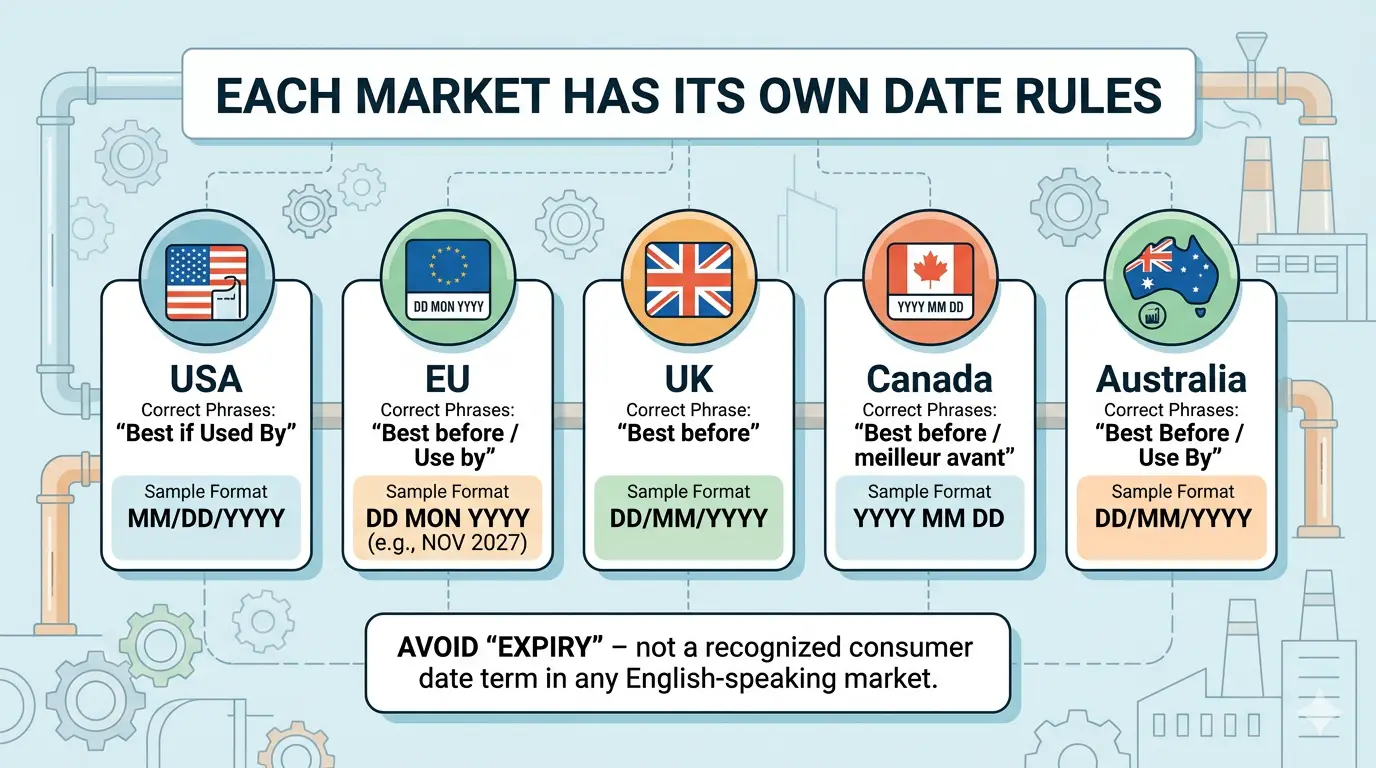
You sell to multiple English-speaking markets. The same product going to the US, UK, Canada, and Australia needs four different date format strategies on the same production line:
Practical takeaway for printer setup. If you ship cross-market, use a three-letter month abbreviation, "27 NOV 2027" or "Best before end NOV 2027." It is unambiguous in every English-speaking market and supported by EU, UK, and AU/NZ regulations EU 1169/2011 FSANZ Code. Pure numeric dates, "03/11/2027", are the riskiest choice for cross-border products.
For a deeper look at how batch codes and lot numbers function across industries, read our batch coding machine buyer's guide.
Question 2: How Do I Set Up the Printer So Dates Come Out Right?
Once you know which date phrase to print, the next question is practical: how does the machine actually generate the right date, batch after batch, without you retyping it every time? This is where most setup errors happen, not in choosing the printer, but in configuring the date logic inside it.
Printing today's date. A handheld TIJ printer, like the 127A or the compact 1691, uses a Date/Time object inserted into the message template. You are not typing "May 26, 2026" each time. You insert the object once, and the printer reads its internal clock every time you pull the trigger. Change the template, not the date SNEED Titan User Guide.
Printing a rolling Best Before date. A product made today with a 6-month shelf life needs "Best before end NOV 2026." The printer generates this automatically using an offset, current date plus 180 days, or plus 6 months, depending on how you configure it. The offset setting (days vs months) is critical: 180 days is not the same as 6 calendar months. Six months from March 1 is September 1 (184 days). Six months from August 1 is February 1 (184 days). A fixed 180-day offset will drift from the correct calendar date as the year progresses.
Combining Lot Number and Date in one print. A typical batch code like "LOT 0526A BEST 27 NOV 2027" is not typed as a single text string. It is four objects placed side by side in the template editor: a fixed Text object ("LOT"), a Serial Number or manual Text object ("0526A"), a fixed Text object ("BEST"), and a Date object with the shelf-life offset applied. Most handheld printers let you drag and drop these objects on the touchscreen to position them SNEED Titan User Guide.
Serial number auto-increment. In the printer's Counter settings, you configure the starting value, the step (usually 1), and the repeat count. A setting of step=1, repeat=1 means each trigger pull increments the number by one. Repeat=3 means each number prints three times before advancing, useful for multi-print batches Generic handheld printer manual. This is how a small producer turns a manual lot-coding process into an automated one.
Four Setup Errors That Break Entire Production Runs
1. The internal clock is wrong. Every auto-generated date, production date, Best Before, Use By, depends on the printer's system clock. A clock set to the wrong time zone, or a unit powered off for weeks, silently produces incorrect dates across the entire batch. Check the clock before every production run SNEED Titan User Guide.
2. Shelf life offset uses days when the spec says months. A product specification that says "shelf life: 6 months" means calendar months, not a fixed number of days. Configuring the printer offset as 180 days instead of 6 months creates a cumulative date error that drifts across the year.
3. Date format is MM/DD for an EU-bound product. The printer's default format may be MM/DD. If your product ships to the EU, UK, or Australia, the format must read DD/MM or use month names. This error is invisible on the production floor, nobody checks the date order until a retailer or distributor flags it EU 1169/2011 Business Companion.
4. The barcode date and the label date conflict. GS1 barcodes encode dates in YYMMDD format, "270527" means May 27, 2027. That same date printed for a consumer needs to read "27 MAY 2027" or "Best before end MAY 2027." The barcode is for scanners; the label is for people. Printing the GS1 code as the consumer-visible date violates EU labeling requirements GS1 GenSpecs EU 1169/2011.
For the full picture on printer types, print head specs, and matching a machine to your daily output, see our complete guide to handheld inkjet printers. For cartridge compatibility and encryption specifically, read our unencrypted ink cartridge guide.
The template editing, date offset, and serial number workflows described above are available on any handheld TIJ printer with a touchscreen interface. Our 127A ($139) and 1691 ($149) both use a 4.3-inch color touchscreen where you drag and drop text, date, serial number, and barcode objects to build templates. Both support auto-incrementing serial numbers with configurable step and repeat, date offset by days or months, and mixed template objects, the exact workflows described above. The difference: the 127A is a full-size handheld with Type-C charging and 4GB internal memory for storing templates on-device; the 1691 is a compact 476g body with a removable 2,000mAh battery for moving between workstations without tethering to power.
Question 3: Why Does the Print Smear Even Though the Machine Works?
The third question comes after the machine is bought and the template is set: why does the date code rub off the moment someone touches it? This is the most frustrating problem in date coding because it looks like a printer failure, but it is almost always a surface problem.
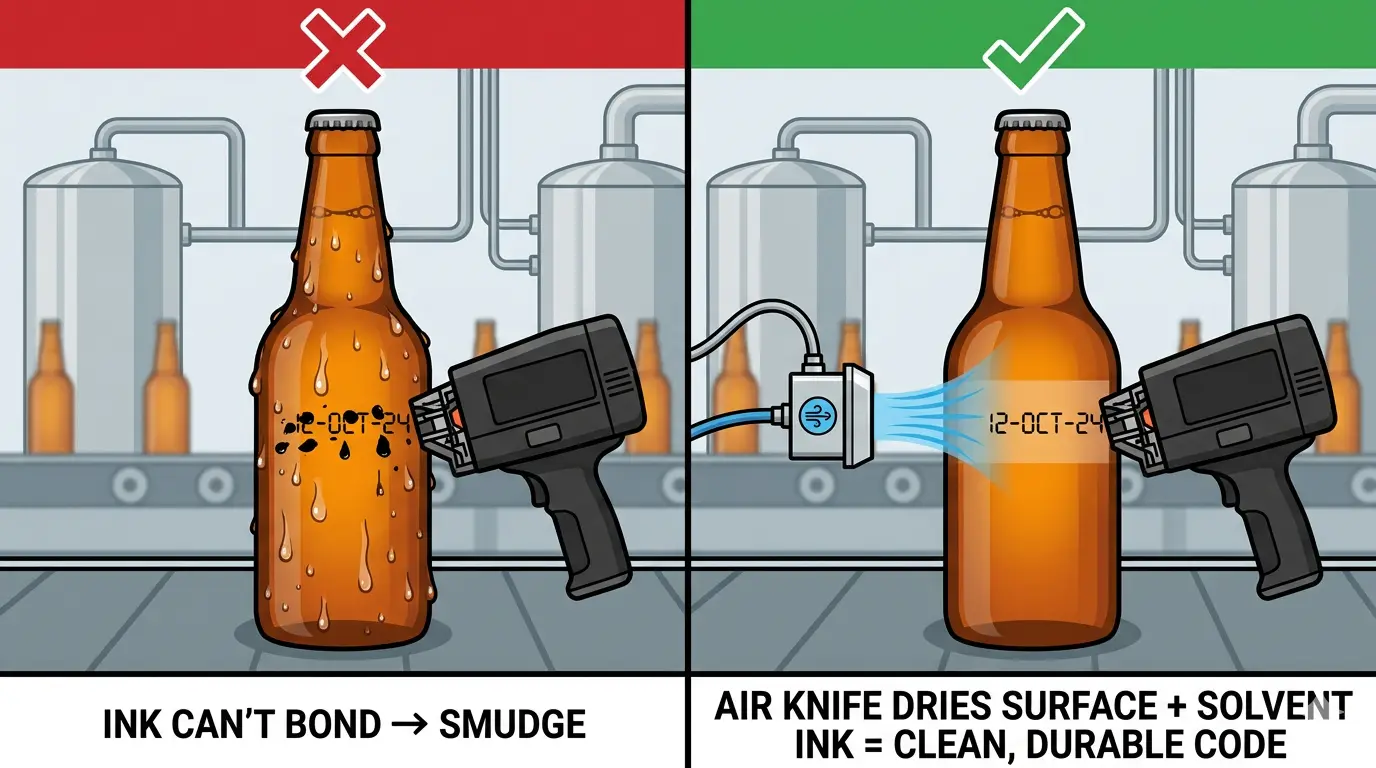
Wet glass bottles. A bottle coming off a chilled filling line collects condensation within seconds. Standard solvent ink cannot bond to a surface covered in a micro-layer of water. The droplet lands on the moisture, never reaches the glass, and smears on contact. The fix is not a better printer, it is an air knife: a compressed-air nozzle positioned to blow the surface dry immediately before the printhead fires Videojet beverage container white paper.
Cold aluminum cans. A can fresh off a filling line is cold and wet at the bottom rim, exactly where most breweries print their date code. A dry can from the pallet prints fine. A cold wet filled can does not. Some breweries solve this entirely by printing date codes before filling, when the cans are still dry. Others use a dedicated high-pressure Loc-Line air nozzle aimed at the exact print spot Reddit r/TheBrewery, can coding thread.
Coated cardboard. What looks like uncoated brown cardboard often has a waxy film or laminate that repels water-based ink. The ink sits on the surface and never absorbs. Solvent-based or UV ink is required Matthews Marking, ink selection guide.
Plastic film and pouches. PP, PE, and PET have low surface energy. Ink beads up instead of wetting out. Solvent-based TIJ inks are formulated for these surfaces, but for food packaging, migration must be evaluated, the ink is on the outside of the package, but small molecules can migrate through the film to the food Kao Collins, flexible packaging inks.
Metal surfaces. The ink typically bonds to the surface coating, not the bare metal. If the coating on your steel drums or aluminum sheets changes suppliers, the ink performance changes with it. Test with actual production stock, not a lab coupon Kao Collins, inkjet printing on metal.
The thread connecting all five surface problems is the ink. Water-based ink fails on non-porous, coated, wet, or low-energy surfaces. Solvent-based quick-dry ink, the type used in the 127A and 1691, is formulated to bond to glass, metal, plastic, and coated cardboard in seconds. It dries fast enough that condensation has less time to interfere, and it contains adhesion promoters that let it grip low-energy surfaces like PP and PE film. If you are printing date codes on multiple surface types across your product line, a non-encrypted handheld printer with quick-dry solvent cartridges, where a replacement cartridge costs $25 to $45 instead of the $42 to $750 that encrypted and proprietary cartridges cost, solves the surface problem and the consumable cost problem at the same time.
How to Check Your Printer Setup Before a Full Production Run
A five-minute verification routine catches the errors that cause batch-wide rejections. Do this whenever you set up a new template, change markets, or start a new production shift.
About the Author
MobileMarking Team | We test handheld inkjet printers, cartridges, and substrates daily across glass, metal, plastic, and cardboard.
Questions about a specific surface or date format requirement? Contact our support team, we test your material and respond within 24 hours.