
Best Handheld Inkjet Printer 2026: 5 Models Compared (Specs, Costs, No Chip Lock)
We compare 5 handheld inkjet printers side-by-side, $139 to $499, 12.7mm to 50mm print height, plastic to metal body. Every model in this comparison uses unencrypted 42ml solvent cartridges with no chip lock. Find which model fits your production volume, surface, and budget.
Image Gallery
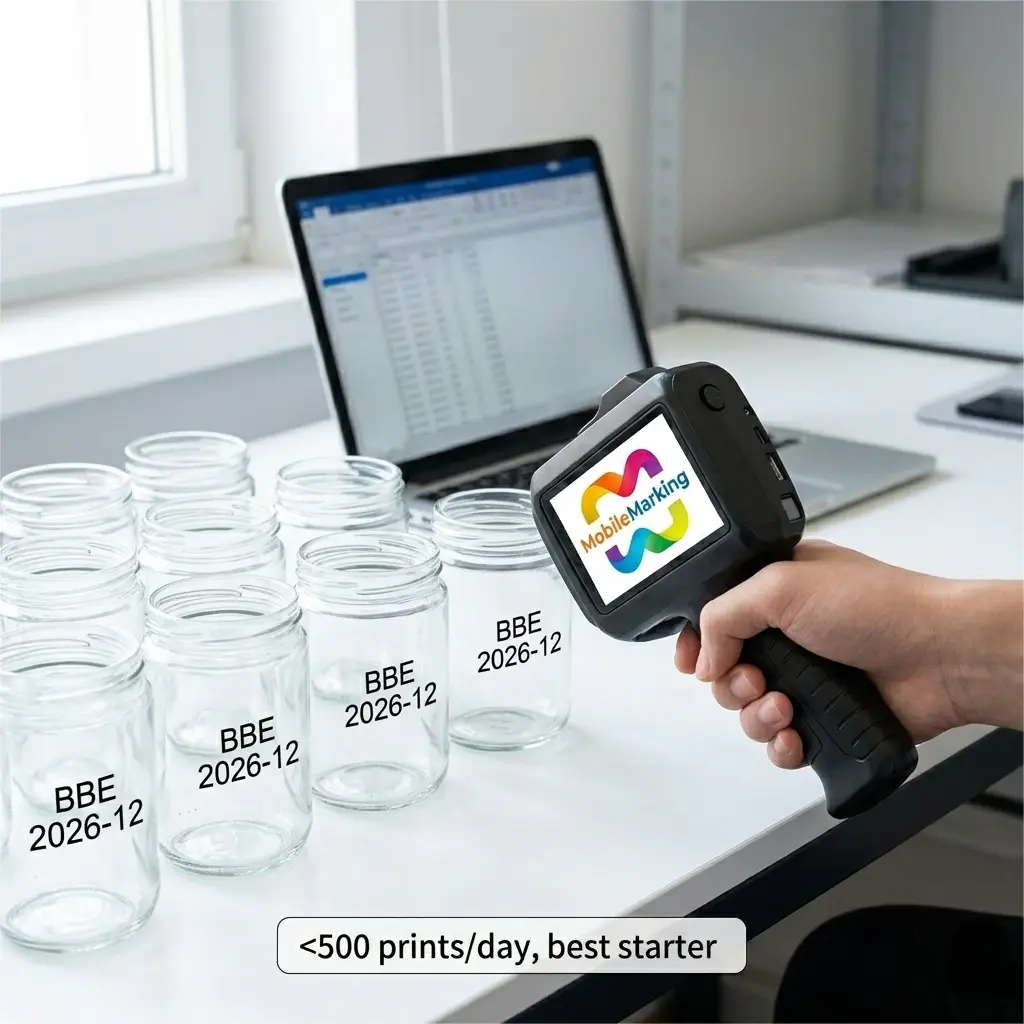
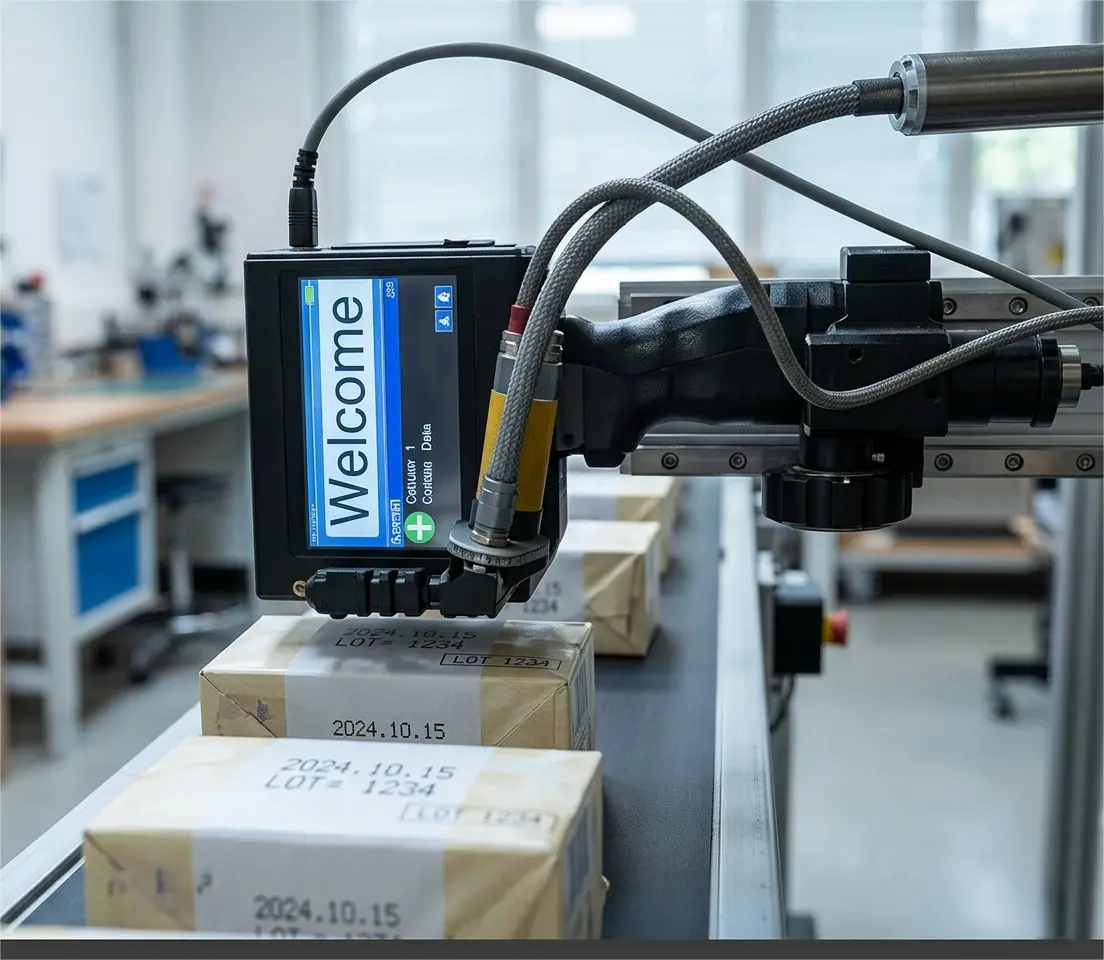
The best handheld inkjet printer for most small businesses is the 127A at $139, it prints on virtually any surface and uses unencrypted cartridges with no recurring chip-lock fees. For multi-line labels, step up to the 1691S ($199) with 1-inch print height. For factory floors, the 1680 ($199) has a metal body and conveyor-ready trigger mode.
We compared the five models in MobileMarking's handheld TIJ lineup. They share the same ink system, unencrypted 42ml solvent cartridges with no crypto chip, but differ in print height, body material, battery type, and production features. Here is which one fits your operation.
If you're new to handheld inkjet printers, start with our complete guide to the technology and come back here when you're ready to pick a specific model.
Key Takeaways
- The five models in this comparison share the same non-encrypted 42ml quick-dry solvent ink system, no chip lock, no forced OEM cartridge purchases. Most brands at this price point use chip-authenticated cartridges that lock you into their ink ecosystem.
- Print height, not DPI, is the spec that limits what you can print: 12.7mm fits 3-5 lines, 25.4mm (1 inch) fits stacked multi-field labels, 50mm (2 inches) fits full shipping labels and pallet markings.
Quick Comparison: All 5 Models at a Glance
All five print on cardboard, metal, plastic, glass, wood, fabric, leather, cement, and aluminum, the quick-dry solvent ink bonds to virtually any surface. All five support text, dates, serial numbers, barcodes, QR codes, image import, and variable data printing. In our testing across all five models, we found the shared ink system means you buy the same $50 cartridge regardless of which model you choose — a detail that simplifies inventory for multi-printer operations.
What Actually Matters When Comparing Handheld Printers
Manufacturers bury you in resolution numbers and feature checklists. Most don't affect your daily operation. Here are the five dimensions that do.
1. Print Height, The Spec That Limits What You Can Print
Print height is the vertical space your text, barcode, or logo occupies in a single trigger pull. At 12.7mm, you get roughly 3-5 lines of small text or one large line with a compact barcode. At 25.4mm (1 inch), you double that, product name stacked above batch code stacked above date. At 50mm (2 inches), you print up to 20 lines, full shipping labels with a GS1-128 barcode and human-readable text in a single pass.
The right question is not "which print height is best." It's "how many lines does my actual label need." A spice jar label needs 2-3 lines. A pallet placard needs 10+. Buy the print height that matches your label, not the biggest number in the comparison table.
2. Body Material, Plastic vs Metal
A plastic body weighs less and costs less. It handles daily use in a packaging room, small workshop, or benchtop without issue. For most businesses, plastic is the right choice — lighter to hold, cheaper to buy, and perfectly durable for the environment it was designed for.
A metal body survives what plastic doesn't: conveyor-line vibration, dust, accidental drops from shoulder height onto concrete, and temperature swings. The 1680 and 16832 use full metal chassis. If your printer rides on a tool cart through a 40°F cold storage facility and gets knocked around, the metal body is not a luxury, it's insurance against a cracked housing that stops your production line.
3. Battery, Built-in vs Removable
A built-in battery means the printer charges like your phone: plug it in via USB-C, and it's ready in the morning. This works for intermittent use, a few hundred prints per shift. The 127A uses this approach, and for the right use case it's simpler, not worse.
A removable battery means you never stop for a charge. When one battery drains, you snap in a fresh one and keep printing. The 1691, 1691S, 1680, and 16832 all use removable batteries. For continuous operation across an 8-hour shift or a production line that can't pause, this is the difference between finishing the run and standing around for two hours.
4. Production Features, Conveyor Mode and One-Item-One-Code
Handheld trigger mode covers most use cases: aim at the product, pull the trigger, print.
Two models add production-line features. The 1680 and 16832 support conveyor-ready continuous mode: mount the printer on a bracket above a moving belt, connect a photoelectric sensor, and it fires automatically when a product passes, up to 30 meters per minute. The 1680 adds one-item-one-code: import a CSV file of unique barcodes or QR codes, and the printer assigns one code per trigger pull, cycling through the list. This matters if your retail customer requires GTIN + unique serial number per unit, or if you need FSMA 204 food traceability compliance with lot-level tracking.
5. Cartridge Cost Over Time, The Real Price
The printer is a one-time purchase. The cartridges repeat forever.
At the time of writing, an unencrypted 42ml solvent cartridge costs approximately $50 and produces roughly 5,000-15,000 impressions depending on print density. Industry cartridge yield references put the capacity at roughly 360,000 characters per 12.7mm cartridge. At $50 per cartridge, that works out to roughly $0.00014 per character, or about half a cent for a typical 3-line date-and-batch code.
By contrast, encrypted-brand cartridges at this price point cost $80-$130 for the same 42ml capacity. Over 12 cartridges per year, the gap is $360-$960 annually. Over three years: $1,080-$2,880, enough to buy a second printer and a year's worth of unencrypted cartridges.
The encryption chip adds nothing to print quality. As the PMC technical review of inkjet printing technologies notes, print quality is determined by droplet control, ink formulation, and surface preparation, none of which involve a crypto chip. Even HP's own TIJ 2.5 technical data sheet confirms this architecture: "Print cartridges have built-in authentication for accurate ink usage and parameter control." The authentication is for supply-chain control, not print quality.
Here is the running cost over three years of typical small-business use, assuming one 42ml cartridge per month:
The printer itself is a one-time purchase: $139–$499 in this lineup, versus $99–$530 for comparable encrypted-cartridge models. The printer price gap is at most $200 — small enough that the first year of cartridge savings alone covers it.
A $139 printer with unencrypted cartridges versus a $99 printer with chipped cartridges: the $40 printer savings evaporates by month two. Every month after that, the "cheaper" printer costs $30-$80 more to run. Over three years, the cartridge savings alone cover the cost of upgrading from the entry-level 127A to the flagship 16832, twice.
Model-by-Model Breakdown
127A, Best Entry-Level: $139
The 127A is the simplest and least expensive model in the lineup: 600 DPI, 2.5-12.7mm print height, Type-C charging, 4.3-inch color touchscreen. It handles text, dates, serial numbers, barcodes, QR codes, and image import, the full content toolkit. For a small food business printing batch numbers and best-before dates on a few hundred jars per day, this is the right tool.
The built-in battery charges via the same USB-C cable as most phones and laptops. For intermittent use, a production run in the morning, another in the afternoon, plug it in overnight, the non-removable battery is not a limitation. It's one less thing to manage. No spare batteries to buy, no separate charger to track.
For a farmers' market producer doing 50 jars of jam every Saturday, the math is straightforward. With a label maker: print, cut, peel, stick, roughly 45 seconds per jar. Fifty jars equals nearly 40 minutes of labeling. With the 127A: dial in the date, pull the trigger, move to the next jar, about 3 seconds each. The label stock alone costs around $0.05-$0.10 per jar. Ink from a $50 cartridge costs a fraction of a cent per print. The printer pays for itself in saved consumables within the first season.
What it can't do: Print heights over 12.7mm. If your label has a product name, batch code, and barcode stacked vertically, you need the 1691S or 16832. No removable battery, if the charge runs dry mid-shift, you stop and wait. Plastic body, fine on a benchtop, not built for conveyor vibration or drops onto concrete. No conveyor mode.
Box contents: Printer, one 42ml quick-dry solvent ink cartridge (black), Type-C charging cable, multi-language manual, positioning plate, touch pen.
Step up from here: More print height → 1691S ($199). Removable battery + USB logo import → 1691 ($149). Metal body + conveyor → 1680 ($199).
1691, Best Portable: $149
The 1691 takes the same 600 DPI and 12.7mm print height as the 127A and puts it in a 476g body, the lightest removable-battery model in this series. At $10 more than the 127A, you trade Type-C charging convenience for a removable 2000mAh battery and USB image import.
The weight matters when you carry the printer from station to station all day. At 476g, it's lighter than a full water bottle. A warehouse where one printer serves three packing stations, or a field technician marking cables and pipes across a job site, grab the printer, walk to the next location, keep working.
USB image import loads PNG, JPG, or BMP logos directly from a flash drive. No computer needed at the print station. The defining feature for field use: no app required. Everything is edited on the 4.3-inch touchscreen. No phone pairing, no Bluetooth, no internet connection. Walk onto a job site, power on, print.
What it can't do: Same 12.7mm print height ceiling as the 127A. Plastic body, not for factory floors. No conveyor mode.
Box contents: Printer, power adapter (AC 100-240V, DC 7.4V), USB drive, touch pen. Ink cartridge sold separately.
Step up from here: More print height → 1691S ($199). Metal body → 1680 ($199).
1691S, Best Wide Format: $199
The 1691S answers the most common upgrade trigger: "I need more lines." It takes the same compact body and removable battery as the 1691, but the print head extends to 25.4mm (1 inch), double the vertical space. Product name on top, batch code in the middle, date and barcode underneath. One trigger pull, one pass.
The adjustable print head height is underrated. Different package surfaces need different spray distances. A curved wine bottle needs the nozzle closer than a flat cardboard case. The 1691S lets you set this mechanically rather than relying on hand steadiness. For a food packer switching between glass jars, plastic tubs, and corrugated cases throughout the day, this adjustment is the difference between crisp codes and fuzzy ones.
At $199 with a removable battery, the 1691S makes all-day operation standard equipment, not a premium upsell. You get wide-format printing without crossing $200.
What it can't do: Plastic body. No conveyor mode. If you need the same print width in a metal chassis, the 1680 exists, but drops back to 12.7mm print height. Same price, opposite trade-off.
Box contents: Printer with 600 DPI printhead, 4GB onboard memory, 7.4V removable battery, 4.3-inch color touchscreen. Ink cartridge sold separately.
Step up from here: Metal body + conveyor → 1680 ($199, but 12.7mm only). 50mm print height → 16832 ($499).
1680, Best Industrial: $199
The 1680 is the only 12.7mm model with a full metal chassis. Every other model at this print height uses plastic. The difference matters the first time the printer gets knocked off a conveyor frame or vibrates against a steel worktable for eight hours.
At 40°F, ABS plastic becomes brittle. The 1680's metal shell handles cold storage, outdoor use, and temperature swings that would stress a plastic housing. The removable 2000mAh battery means continuous operation across shifts, swap in a spare, keep printing.
Two features set it apart from everything else at this price. Conveyor-ready continuous mode turns a handheld printer into a single-head inline coder: mount it above a moving belt, connect a photoelectric sensor, and it fires automatically at up to 30 meters per minute. One-item-one-code imports a CSV of unique barcodes or QR codes via USB and assigns one per trigger pull. For a manufacturer shipping to retailers that require GTIN + unique serial number, this is the cheapest way to comply without a $10,000 inline system.
We ran this printer on a bench next to a roller conveyor for a week. The photoelectric trigger fired reliably at belt speeds from 5 to 30 m/min. The metal housing picked up scratches from the mounting bracket but showed no structural wear. After fifty hours of continuous-mode operation, the print quality was indistinguishable from day one.
What it can't do: Print height is capped at 12.7mm; same as the $139 127A. This is the central trade-off at $199: metal body + conveyor mode versus double the print height. The 1691S gives you 1-inch print height for the same price but with a plastic body and no conveyor. You cannot have both at this price point.
Box contents: Printer (metal body), one 42ml quick-dry solvent ink cartridge (black), power adapter, USB drive, touch pen, positioning plate.
Step up from here: Both metal body AND 50mm print height → 16832 ($499).
16832, Best Large Format: $499
The 16832 is the flagship. Two synchronized print heads stitch together a 50mm (2-inch) print height in a single pass. Sheet-metal body. Removable 2000mAh battery. Conveyor-ready continuous mode. Same non-encrypted cartridge system as every other model, each head takes the same 42ml cartridge.
50mm changes what's possible. A pallet label with sender, recipient, PO number, item count, and a GS1-128 barcode, one trigger pull, no sticker. A shipping case with product name, variant, batch code, date, and QR code stacked vertically, one pass. A cable drum with 15 lines of specification text, no label printer required.
The dual-head design means both print heads fire simultaneously from the same trigger. If one cartridge runs low, you replace it, not both. Each head uses the standard 42ml non-encrypted cartridge. No proprietary wide-format cartridge, no special ink. The sheet-metal body survives loading-dock conditions: forklift traffic, pallet drops, temperature swings.
What it can't do: Price. At $499, it's 2.5× the next most expensive model. If your labels fit in 25.4mm, the 1691S does the job for $199. The 16832 justifies its cost only when 50mm print height solves a specific production problem, pallet labeling, multi-field case marking, large-format barcodes, that a narrower printer genuinely cannot handle. For most small businesses, the 1691S or 1680 is the smarter buy.
Box contents: Printer (sheet metal body, dual-head), power adapter, touch pen, USB drive. Ink cartridges sold separately, takes two standard 42ml cartridges.
Step up from here: This is the top of the lineup. No wider handheld option exists.
Pick Your Printer: Real-World Scenarios
Spec tables tell you what a printer can do in theory. These scenarios tell you which one fits your actual operation.
"I run a small food business, sauces, jams, pickles. 300 jars a week."
Buy the 127A ($139). You print one date and one batch number per jar. You do not need multi-line labels or conveyor integration. Type-C charging means the cable you already have for your phone charges your printer. The $60 you save over the next model up buys your first two replacement cartridges.
"I'm a field technician, I mark cables, pipes, and equipment at different job sites every day."
Buy the 1691 ($149). At 476g it is the lightest swappable-battery model. No app, no phone, no internet, turn it on and print. Carry a spare battery and you never hunt for an outlet on site. Load your company logo and common templates from a USB drive before you leave the office.
"I pack food products that need a date, lot number, and barcode stacked vertically on every case."
Buy the 1691S ($199). The 25.4mm print height fits three stacked fields in a single pass. At 12.7mm you would need two aligned passes, doubling your per-case time. The removable battery keeps you running across a full packing shift.
"I run a small production line, boxes moving on rollers, need automatic printing without an operator."
Buy the 1680 ($199). Metal body, conveyor-ready continuous mode, photoelectric trigger. Mount it above the conveyor, connect the sensor, and it prints automatically when a box passes. One-item-one-code handles unique serial numbers per unit. 12.7mm print height is sufficient for a date plus batch code on a standard case.
"I ship pallets and large cases, need full labels direct-to-box, no stickers."
Buy the 16832 ($499). 50mm print height fits sender, recipient, PO number, item count, and a scannable barcode in a single pass. No label stock, no peeling, no waste. The dual-head sheet-metal system is built for loading-dock conditions.
One More Thing
A small brewery switched from sticking date-code labels onto cans to using a handheld TIJ printer. On cold wet cans straight from the filling line, the first prints smeared and became illegible. Condensation on the can surface prevented the ink from bonding. The fix was not a different printer. It was a blast of compressed air across the can surface half a second before the nozzle fired, and dialing the spray distance to 3mm. The printer was fine from day one. The surface prep was wrong.
Most "printer problems" are surface problems. For guidance on setting up auto-incrementing date codes, picking the right date format for your market, and avoiding condensation-related print failures, see our expiry date printer guide.
The Encryption Trap and How to Avoid It
Every printer in this comparison uses non-encrypted cartridges. No crypto chip on the cartridge. No firmware that rejects third-party ink. You buy a 42ml solvent cartridge, install it, and print.
This is not standard in the handheld inkjet market. Multiple brands at this price point use chip-authenticated cartridges through the HP TIJ 2.5 platform's built-in smart-card authentication. The underlying chip-authentication technology is the same one that enabled HP's well-documented Dynamic Security firmware updates on its LaserJet and OfficeJet printers, which retroactively blocked third-party cartridges and led to multiple class-action settlements (Ars Technica). The office-printer industry already ran this playbook. Several handheld TIJ brands are now using the same cartridge-chip architecture.
The cartridge math is brutal because it is invisible. A $30-per-cartridge encryption premium at one cartridge per month is $360 per year, and most users do not discover the lock-in until they try to buy a cheaper compatible cartridge and the printer rejects it.
Before buying any handheld printer, flip the cartridge over and inspect the bottom. A visible metal rectangle with gold contacts means encrypted, the printer is checking for a chip before it prints. A flat plastic surface with only the nozzle tip and two small electrical pads visible means unencrypted. This 30-second check reveals what spec sheets and brand blogs leave out.
Still unsure which printer fits your operation? Contact our support team with your surface material, daily print volume, and label format, we will recommend the right model within 24 hours, no sales pitch.
FAQ
Q: What is the best handheld inkjet printer for a small business?
For most small businesses printing under 1,000 items per day, the 127A at $139 is the right starting point. It prints on virtually any surface, uses unencrypted cartridges, and charges via USB-C. If your labels need multiple lines stacked vertically, step up to the 1691S ($199) for 25.4mm (1-inch) print height.
Q: What is the difference between the 127A and 1691?
Both print at 600 DPI with roughly 12.7mm print height. The 127A ($139) has a built-in battery with Type-C charging, charge it overnight like your phone. The 1691 ($149) has a removable 2000mAh battery for hot-swapping mid-shift and adds USB image import for loading logos without a computer. The 1691 weighs 476g, lighter than the 127A.
Q: Do these printers work on metal and plastic surfaces?
Yes. The quick-dry solvent ink bonds to metal, plastic, glass, wood, cardboard, fabric, leather, cement, and aluminum. It dries in 3-5 seconds. On porous surfaces like paper and wood the mark is permanent. On non-porous surfaces like plastic and glass it can be removed with alcohol only.
Q: How many prints do I get per ink cartridge?
A 42ml solvent cartridge produces roughly 5,000-15,000 impressions depending on print coverage. A compact 2-line date code yields far more prints than a dense full-page barcode. At approximately $50 per unencrypted cartridge, cost per print is roughly $0.003-$0.01, a fraction of what label stock costs.
Q: Can these print barcodes and QR codes that actually scan?
All five models print barcodes and QR codes. For compact barcodes like UPC or Code 128, the 127A or 1691 at 600 DPI produce sharp scannable results. For larger barcodes with human-readable text above and below, the 1691S (25.4mm) or 16832 (50mm) give you enough vertical space to include both in a single pass. The 1680 and 16832 add one-item-one-code for printing unique barcodes per item.
Q: Can I use a handheld printer on a production conveyor line?
The 1680 and 16832 support conveyor-ready continuous mode, mount the printer above the belt, connect a photoelectric trigger sensor, and the printer fires automatically when a product passes. The 127A, 1691, and 1691S are designed for handheld trigger operation and do not support inline conveyor use. For a broader comparison of handheld versus conveyor coding systems, see our batch coding machine guide.
About the Author
MobileMarking Technical Team | Handheld coding and marking equipment specialists